Problem Space — Brand New Mobile Apps
Fleet Management is a discipline within the telematics industry that requires digital products to support vehicle tracking, asset tracking, workforce management, safety compliance, delivery management, and dispatch. The complete B2B solution includes mobile apps for en-route workers and a desktop portal for backend office teams.
Path navigation to destinations.
Driving log creation and behavior scoring.
Dispatch task allocation and asset pickup.
Backend team support and communication.
Project Outcome
Over 3 months, I worked closely with domain experts and the leadership team to define key value propositions for each app, develop UX concepts and design guidelines, and deliver information architecture, style guides, interaction flows, wireframes, UI kits, visual mocks, and prototypes.
This work helped the company establish its mobile app experience strategy, extend its business offerings, and build a foundation for the next phase of feature development.

Research & UX Strategy
Domain Knowledge & User Study
Telematics was new territory for me. My priority was to first understand who the user groups were and what their use scenarios looked like — especially compared to the Fleet Management web portal we were building in parallel. Since transportation is a regulated industry, I also needed a solid grasp of safety compliance requirements. My methods included interviews with a regulation specialist, group discussions with product owners, and persona narratives for en-route workers across driving, transporting, and dispatch scenarios.
UX Design Tactic
With no historical web statistics to draw from (this was a greenfield build), and a SaaS model that needed to minimize learning curves for drivers — many of whom aren't tech-savvy — I proposed a content-first UX model instead of a menu-driven one. The actual content surfaces directly on the UI, reducing interaction friction and making the apps self-explanatory from the first launch.
App #1 — Fleet Mobile Worker
Designed for long-distance drivers in logistics and transportation. The app helps them ensure assets are secure, vehicles are in good status, locate nearby service stations and parking, and stay aware of their driving behavior — all from their phone while en route.
Information Architecture
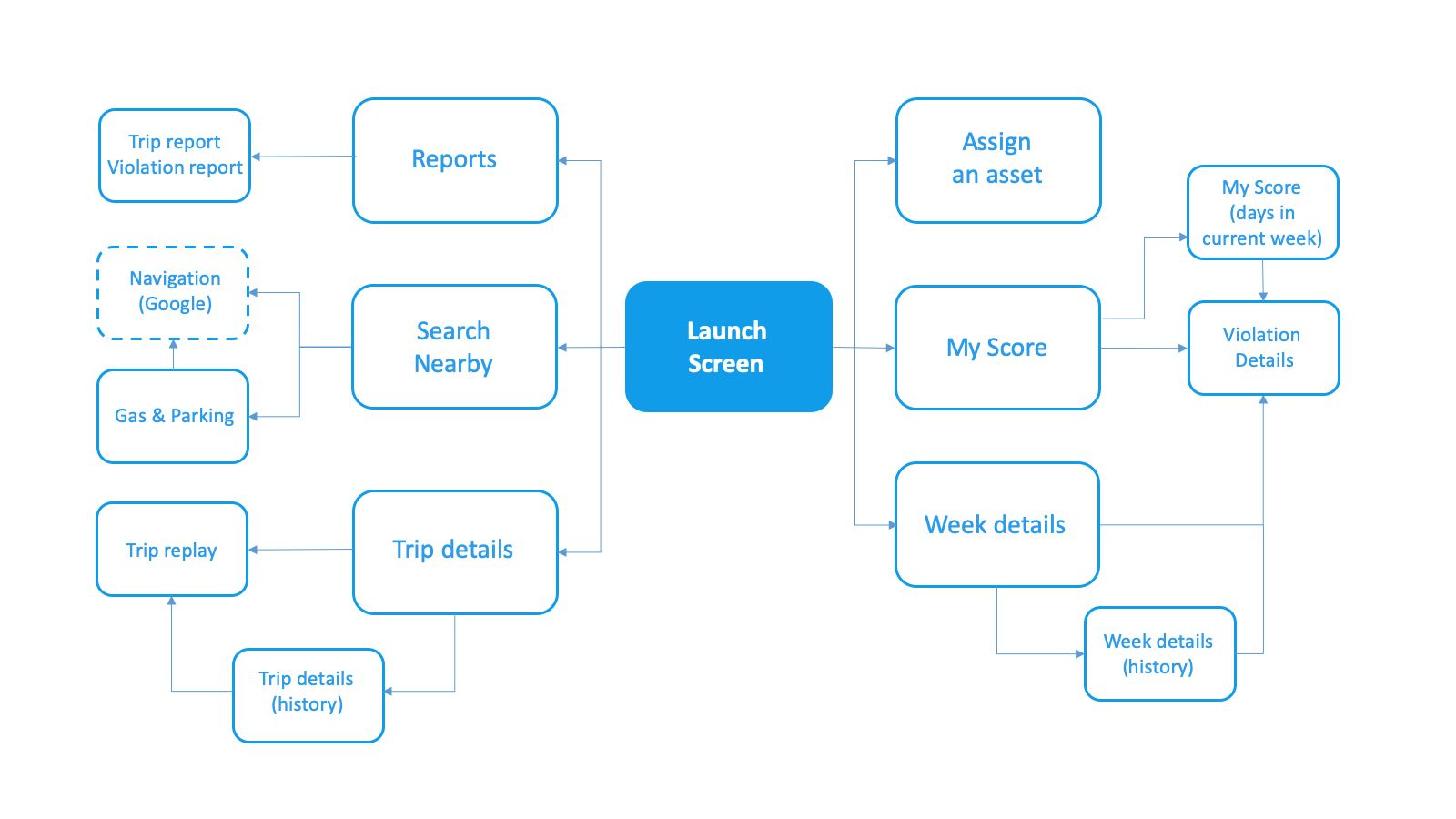
Following the content-first tactic, the app's hero page serves as a content hub and navigation bridge to all functional areas — trip statistics, driving behavior scoring, en-route assistance, and reports.
Visual Exploration
I created two visual directions, weighing company image, product character, and current design trends.
Visual Concept A — moodboard and exploration:


Visual Concept B — moodboard and exploration:


After discussions with the leadership team, we moved forward with Concept A, with further refinements.
Final Mocks


App #2 — IFTA Fuel Tax Reporting
IFTA (International Fuel Tax Agreement) requires carriers to report the fuel purchased and distance traveled per jurisdiction each quarter. This app helps carriers save administration time and eliminate manual data reconciliation — aggregating fuel transactions by location and fuel type into a pre-built compliance report.
Concept Ideation
The overall functions were relatively straightforward. My ideation focused on how to minimize the learning curve for drivers moving from paper forms to a digital tool. I proposed using a paper log analogy — a form header for the trip overview, with line items for individual fuel consumption records — so the mental model would feel immediately familiar.

Concept Mocks
The experience model: whenever drivers cross a state line or add fuel, all they need to do is tap a button — the rest is automated. A first-time onboarding tip guides new users through creating their first trip.

App #3 — Resource Tracker
Designed for en-route workers who answer dispatch requests. The app enables users to receive tasks, start, complete, or reject them, navigate to destinations, and view delivery windows and contact information.
Design Challenge
The main challenge was how to present dispatch tasks in chronological order when delivery time windows frequently overlap. After working with the development team to understand the backend dispatch algorithm — which optimizes assignments based on worker location and availability — I designed a loose timeline concept: overlapping tasks appear in the same time section, all in sequence. Completed or rejected tasks update in place.
The key to a usable experience was ensuring that available actions are always contextually accurate:
An upcoming task shows leave-by time and surfaces a Start action.
A newly dispatched task is called out distinctly, with an Accept or Decline option available for a limited window.

A second key function lets workers mark their status — on duty, on break, or off duty — so the dispatch system knows when and to whom to send new tasks.

Concept Mocks
